Introduction
A modular, data-driven interaction framework built in Unreal Engine 5. The system handles everything between a player looking at an object and an interaction executing — detection, candidate selection, condition evaluation, trigger behavior, and UI feedback — as a set of decoupled, composable components.
The goal was to build something that a designer could configure entirely from the editor and a programmer could extend without touching existing code. Adding a new interactable actor means attaching a component and filling out options. Adding a new trigger type means writing one class. Adding a new condition means writing one class. Nothing else in the system needs to change.
Built with C++ and designed around Unreal's component and interface patterns, with Blueprint exposure throughout so both disciplines can work with it.
InteractorComponent — Active side
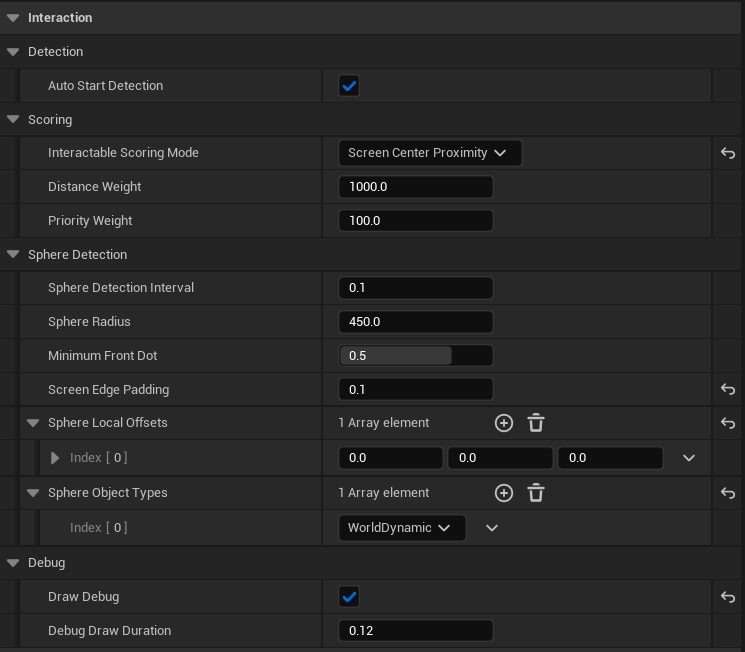
Handles detection, candidate selection, focus, and input handling. This component drives interactions.
Detection
Timer-Based Detection
The InteractorComponent uses a timer event that fires every 0.1 seconds instead of
running detection every frame via Tick. This is a deliberate performance decision —
interaction detection does not need to be frame-perfect, and 10 checks per second is responsive enough for
immediate feedback. The timer interval is exposed to the editor so designers can tune detection frequency
per use case without touching code.
The Detection Pipeline
Each timer tick runs a sequential filter pipeline. Candidates must pass every stage to be considered
interactable; if any check fails, the actor is rejected immediately. Only actors that survive all five
checks are added to CurrentInteractables.
-
Sphere Overlap
The component performs one or more sphere overlaps around the owner. Multiple sphere offsets can be configured so the detection volume is shaped around the character rather than centered on the origin. Only actors inside at least one sphere are considered.
-
Has an InteractableComponent
The hit actor must have a
UInteractableComponentattached. Actors without the component are skipped immediately, keeping the system clean and opt-in. -
In Front of the Camera
The actor must lie in front of the player's camera forward vector. This prevents focus on items behind the player, even if they are within detection range.
-
On Screen
The actor must be within the player's screen bounds. This filters out valid world objects that are technically visible but off-screen, preventing confusing highlights.
-
Clear Line of Sight
A line trace is fired from the owner toward the candidate using
ECC_Visibility. If anything solid blocks the path, the actor is rejected. The trace length is configurable.
Once an actor survives the full pipeline, it is added to the valid candidate set and later evaluated by the best-candidate selection logic.
Candidate Selection
With potentially multiple valid candidates, the system scores each one and selects the highest. The scoring
strategy is configurable via EInteractableScoringMode:
- DistanceOnly — closest wins.
- PriorityOnly — designer-set priority wins, distance ignored.
- Distance_And_Priority — distance is dominant, priority is the tiebreaker.
- Priority_And_Distance — priority is dominant, distance is the tiebreaker.
- HybridThreshold — priority wins up close, distance wins at range.
- ScreenCenterProximity — whoever the player is looking at most directly wins.
HybridThreshold is the most interesting mode — it handles cases where a quest-critical object should win focus when the player is close, but distance takes over naturally in open environments.
Focus vs. Interaction Eligibility
Detection is intentionally separate from interaction eligibility. Detection runs across all candidates every 0.1s. Condition evaluation — range limits, required states, and any designer-configured rules — only runs on the single focused candidate. This keeps the system efficient at scale and provides a clear answer to both “what am I looking at” and “can I actually interact with it right now.”
Focus & UI
On Item Focus
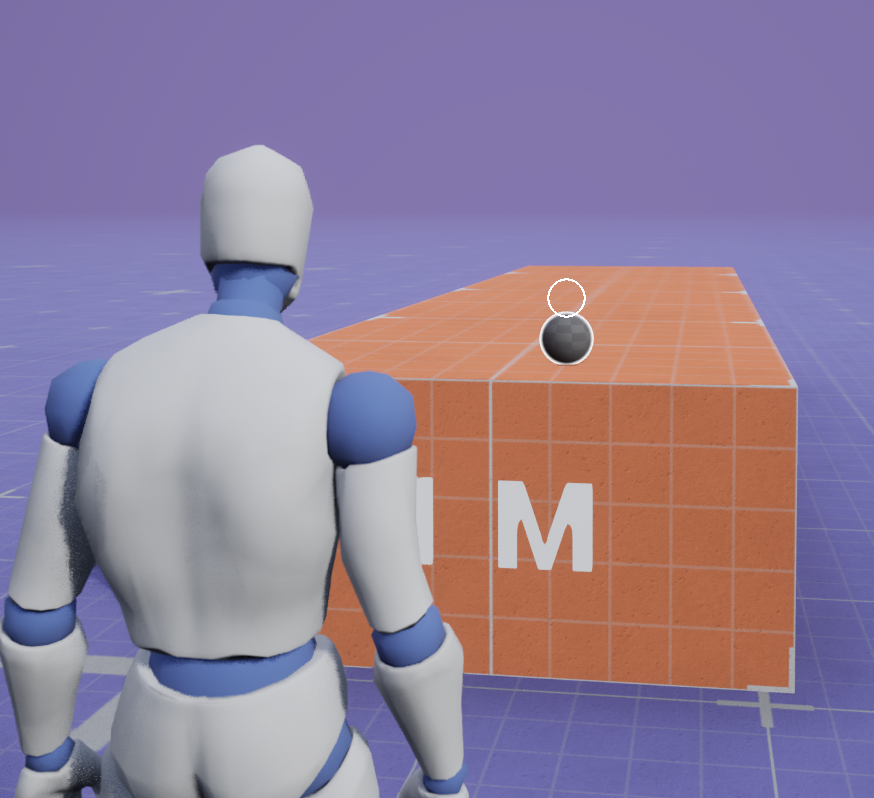
Conditions were met
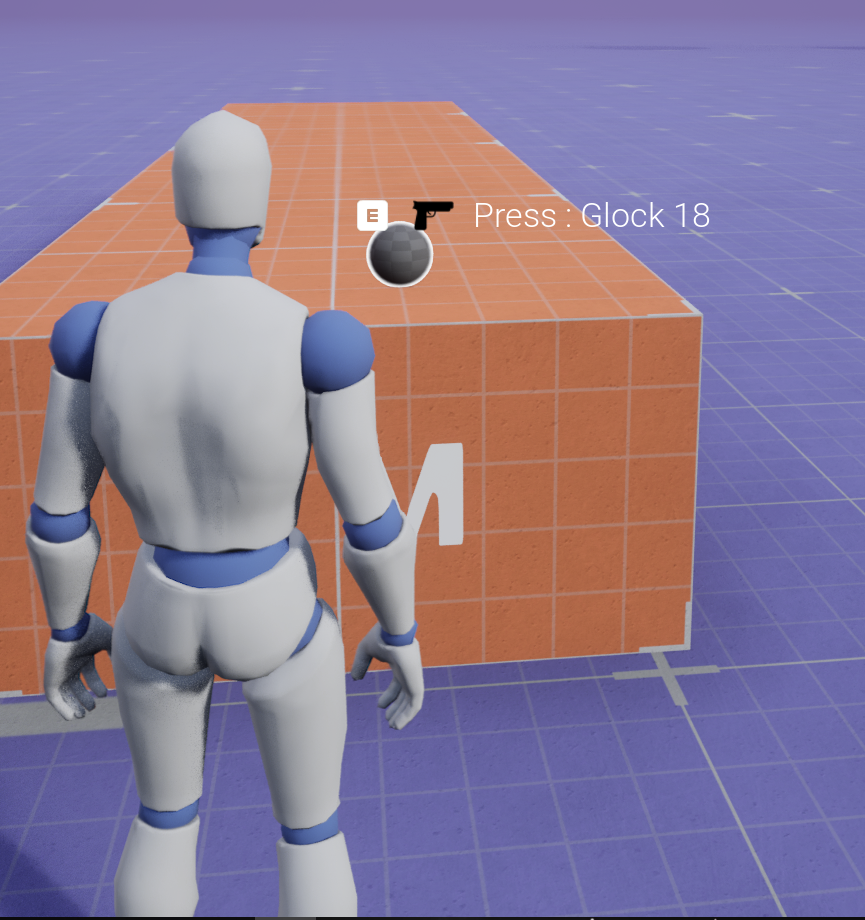
Handles clean focus transitions and UI notification when the best candidate changes.
SetFocusedInteractable manages the transition: it notifies the previous interactable that it lost focus, notifies the new one that it gained focus, and broadcasts the change to the UI. If the same actor remains the best candidate, it is a no-op to avoid redundant broadcasts every 0.1s.
Once an item is focused, OnItemFocused assembles an FInteractionDisplayData
packet and broadcasts it in one shot. That packet includes prompt text, trigger type, world location for
widget placement, and current runtime state. The UI only needs to listen to one delegate and never has to
query the interactable directly.
Input Handling
Input feeds into four functions — InteractStarted, UpdateInteraction ,InteractionCompleted, and InteractionCancelled — each mapping to a distinct input event and passing the appropriate flags through FInteractionTriggerContext.
The first thing InteractStarted does is re-validate conditions at the moment of input. Focus doesn't guarantee interaction is still valid — a condition could have changed in the 0.1s since last detection — so CanInteract is checked again before anything executes.
From there, the system splits into two paths:
No trigger — the interaction executes immediately. Some interactions don't need any trigger behavior, just a press. There's no reason to run them through the state machine so they skip it entirely.
Has a trigger — the trigger drives a state machine through EInteractionTriggerState. StartTrigger, UpdateTrigger, and StopTrigger are called at the appropriate input events, each receiving the current FInteractionTriggerRuntimeState and returning the new state. The interactor owns that state, not the trigger — so the trigger itself is stateless and reusable across any number of interactors.
The state reset logic in InteractStarted is worth noting — if the active state is Completed, Cancelled , or the interaction tag has changed, the state resets before starting fresh. This handles the edge case where a player quickly re-presses after a cancelled hold without getting stuck in a dirty state.
NotifyInteractionExecuted is the other interesting piece. After an interaction completes, rather than just broadcasting done, it re-queries the interactable for fresh display data. This handles stateful interactables — a light switch that just toggled should immediately show "Turn Off" instead of "Turn On" without the player having to look away and back. If no valid option exists after execution, OnInteractionLost fires instead.
InteractableComponent
The InteractableComponent is the passive counterpart to the InteractorComponent. It lives on any actor that can be interacted with — a door, a pickup, a switch, an NPC — and its job is to hold static configuration and route execution. It does no detection, no scoring, no input handling. Tick is disabled by default.
What It Holds
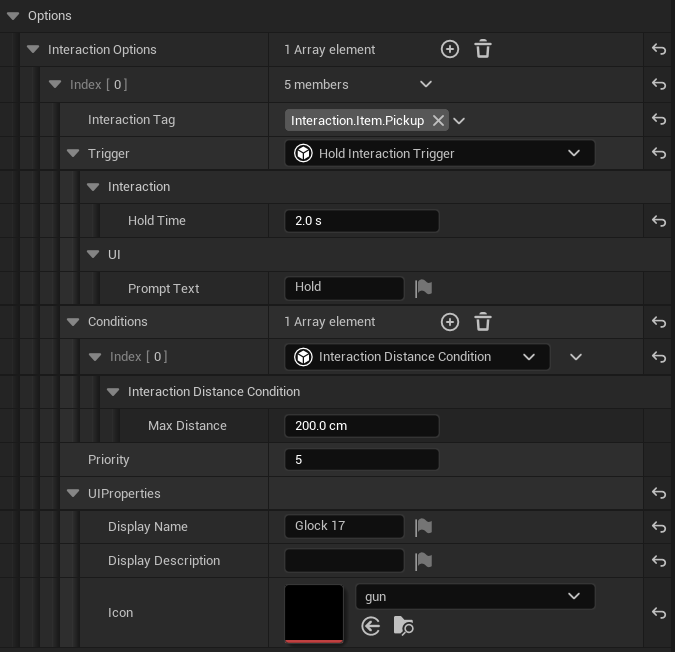
The component owns an array of FInteractionOptions — the static, designer-authored definitions of what this actor can do. Each option has a trigger, a set of conditions, a priority, and UI properties. This data never changes at runtime; all mutable state lives on the InteractorComponent side.
InteractablePriority feeds directly into the InteractorComponent's scoring system, letting designers control how this actor competes against nearby interactables without touching any code.
Option Selection
This is a BlueprintNativeEvent, so it can be overridden in Blueprint or C++. The default implementation checks whether the owning actor implements UInteractableOptionInterface first — if it does, the actor handles its own option selection logic entirely. This is the escape hatch for complex cases like an NPC with context-sensitive dialogue options that change based on quest state. If the owner doesn't implement the interface, the component falls back to its own InteractionOptions array.
Execution
When the InteractorComponent decides an interaction should execute, it calls ExecuteInteraction on the focused interactable. The component re-validates conditions one final time, then routes execution through IInteractableReceiver::Execute_HandleInteraction on the owning actor. The component never knows what the interaction actually does — opening a door, adding an item to inventory, triggering a cutscene — that's entirely the owning actor's responsibility. The component is just the routing layer.
This interface-based dispatch keeps the interaction system completely decoupled from any specific gameplay code. Adding a new interactable type means implementing IInteractableReceiver on the actor, nothing else.
UI Anchor
Rather than hardcoding where the interaction prompt appears in world space, the component has a configurable anchor system. It looks for a named scene component (UIWorldAnchor by default) on the owner, falls back to a component reference if set, and finally falls back to the root component plus a configurable offset. Designers can place the anchor exactly where the prompt should float without any code changes.
Triggers — Passive & Extensible side
Defines how input interactions are processed and executed over time. Triggers are modular, configurable, and built to support multimedia/animated examples.
Trigger — Base Class
All trigger types derive from UInteractionTrigger, a stateless abstract base class. Triggers
are explicitly forbidden from storing hold progress, mash counts, timers, or any per-player state.
Stateless Architecture
All mutable data lives in FInteractionTriggerRuntimeState, which is owned entirely by the
InteractorComponent. This means the same trigger object on an interactable can drive
independent interactions for multiple players simultaneously without any data conflict or race conditions.
The Core Interface
The interface relies on three key functions that receive the current runtime state by reference and return
a new EInteractionTriggerState:
- StartTrigger — Called on initial input press.
- UpdateTrigger — Called per-frame/tick while input is sustained.
- StopTrigger — Called on input release or cancellation.
All three are BlueprintNativeEvent symbols, allowing designers to create custom triggers
entirely within Blueprints without touching C++ code. The base implementations handle common bookkeeping:
UpdateTrigger accumulates elapsed time, while StopTrigger automatically cancels
uncompleted interactions.
Press Trigger
The simplest implementation possible. When input is detected, StartTrigger instantly sets
Progress to 1.0, changes the internal state to Completed, and
returns immediately.
The InteractorComponent catches this completion state and executes the interaction within the
exact same frame as the input press. No UpdateTrigger or StopTrigger overrides are
needed; the base class defaults are safely bypassed.
Hold Trigger
A duration-based interaction type where HoldTime is the primary designer-exposed configuration
property (clamped to a minimum of 0).
Execution Flow & Safety
UpdateTrigger runs every frame while input is held, accumulating ElapsedTime and
computing Progress as a normalized 0–1 value against HoldTime. This raw progress
percentage is passed cleanly to the UI to drive elements like progress bars.
Two key safeguards are built into the implementation:
- Early Release:
StopTriggercallsResetbefore evaluating state, ensuring that releasing the input early always cancels the interaction cleanly regardless of progress. - Zero-Time Guard: The system guards against
HoldTime <= KINDA_SMALL_NUMBER. If a designer sets the hold time to zero, the logic bypasses a divide-by-zero error and snapsProgressdirectly to 1.0.
Mash Trigger
The most mechanically dynamic interaction type, introducing a tug-of-war decay mechanic where progress continuously degrades if the player stops pressing.
The Decay Mechanic
Each distinct press increments Progress by a discrete ProgressPerPress value.
Simultaneously, TickTrigger executes every frame, constantly subtracting
DecayRate * DeltaTime from the total pool.
To succeed, the player must press fast enough to outpace the decay curve and push Progress to
1.0 before it drains back to zero. Both ProgressPerPress and
DecayRate are exposed to the editor, giving designers complete control over the physical
difficulty of the mash interaction.
Conditions — Validation Side
Validates whether an interaction is legally permitted based on game state, positioning, or custom rules. Conditions enforce constraints without altering state or handling player input.
Validation Architecture
The base class optimizes performance by deliberately separating validation into two core methods:
- CanInteract: Returns a simple boolean fast-path. This is utilized during the 0.1s detection loop to instantly discard options that fail basic requirements without wasting CPU cycles.
- CheckInteraction: Returns a detailed
FInteractionResultpayload (including structural failure types and user-facing reasons). This heavier function is called lazily—only when the system needs to explicitly inform the UI why an interaction is currently blocked.
Condition — Base Class
Conditions strictly answer a single architectural question: "Is this interaction currently allowed?" They are explicitly isolated from managing input, advancing progress, or executing gameplay logic.
This separation of concerns is strictly enforced by design; the base class does not have access to trigger
states or input contexts. Instead, it receives an immutable FInteractionQuery payload
containing only context about who is attempting to interact with what.
Distance Condition
UInteractionDistanceCondition evaluates spatial proximity by checking whether the interactor
is within a specified MaxDistance of the target interaction point.
The distance threshold is a unit-annotated property clamped directly within the editor. When validation
fails, CheckInteraction populates the failure state with
EInteractionFailureType::OutOfRange, allowing the UI layer to render contextual
range-restriction feedback.
Gameplay Tag Condition
UInteractionGameplayTagCondition provides a highly flexible system validation layer by
independently parsing required and blocked gameplay tags across both the interactor and the interactable
targets.
This allows designers to cleanly construct quest-gated objects (requiring the player to possess a specific
story tag) or combat-restricted objects (blocking interaction if the player carries a debuff tag). To
prevent code duplication between the boolean fast-path and the UI payload path, tag evaluation rules are
abstracted into a file-scoped PassesTagRules helper. Failures return
EInteractionFailureType::TagGated paired with a formatted diagnostic string detailing the exact
missing or blocking tags.
Line of Sight Condition
UInteractionLineOfSightCondition executes an explicit line trace from the interactor's eye
position to the target utilizing an adjustable height offset.
This serves as an intensive, option-level validation check completely independent from the coarse
detection-layer raycasts performed by the InteractorComponent. This dedicated condition is
explicitly attached to specific, granular interaction options where strict geometric occlusion matters—such
as disabling a hidden panel switch if its specific mechanical face is visually obstructed by world geometry.
Structs
The structs are worth looking at because they reflect some deliberate architectural decisions.
FInteractionQuery vs FInteractionTriggerContext are intentionally separate. FInteractionQuery is immutable — just who is interacting with what, tagged by gameplay tag. It's passed into conditions which only need to evaluate, not react to input. FInteractionTriggerContext extends that with live input state (bInputPressed,bInputHeld, DeltaTime) because triggers need to drive behavior over time. Keeping them separate means conditions stay stateless and reusable.
FInteractionTriggerRuntimeState is owned by the InteractorComponent, not the interactable. This is important — the same chest or door in the world can be mid-interaction for one player while untouched by another. Mutable per-interactor state lives on the interactor side.
FInteractionResult uses static factory methods Success() and Fail() to keep callsites clean and enforce that a failure always carries both a FailureReason and a FailureType. The type isn't just metadata — the UI uses it to drive the correct icon (a lock icon for Locked, a level badge for LevelGated, or a missing Key/GameplayTagetc.) without any string parsing or special casing.
EInteractionFailureType deserves a mention on its own. Rather than returning a generic boolean, the system tells the UI why interaction failed — tag gated, quest gated, out of range, locked, and so on. This makes contextual UI feedback a first-class concern of the system rather than something bolted on later.